
Product
What ClipPush does, and where it fits.
These are the parts of ClipPush that support the release work. See what each one does, what stays in your hands and how the pieces connect.
AI-generated thumbnails
Give every clip a cover worth stopping for.
A paused interview frame rarely tells the whole story. Create a thumbnail with your guest, your podcast branding and a title that gives people a reason to watch.
- You set the direction.
Add guest photos, logos and style references. Plan the look before you generate.
- Each clip gets its own cover.
ClipPush uses what the clip is actually about to shape its headline and design, with your branding running through the set.
- Create the whole batch.
Select multiple clips and generate their thumbnails together. Review the results and refine individual covers as needed.
BeforeA frame from the interview
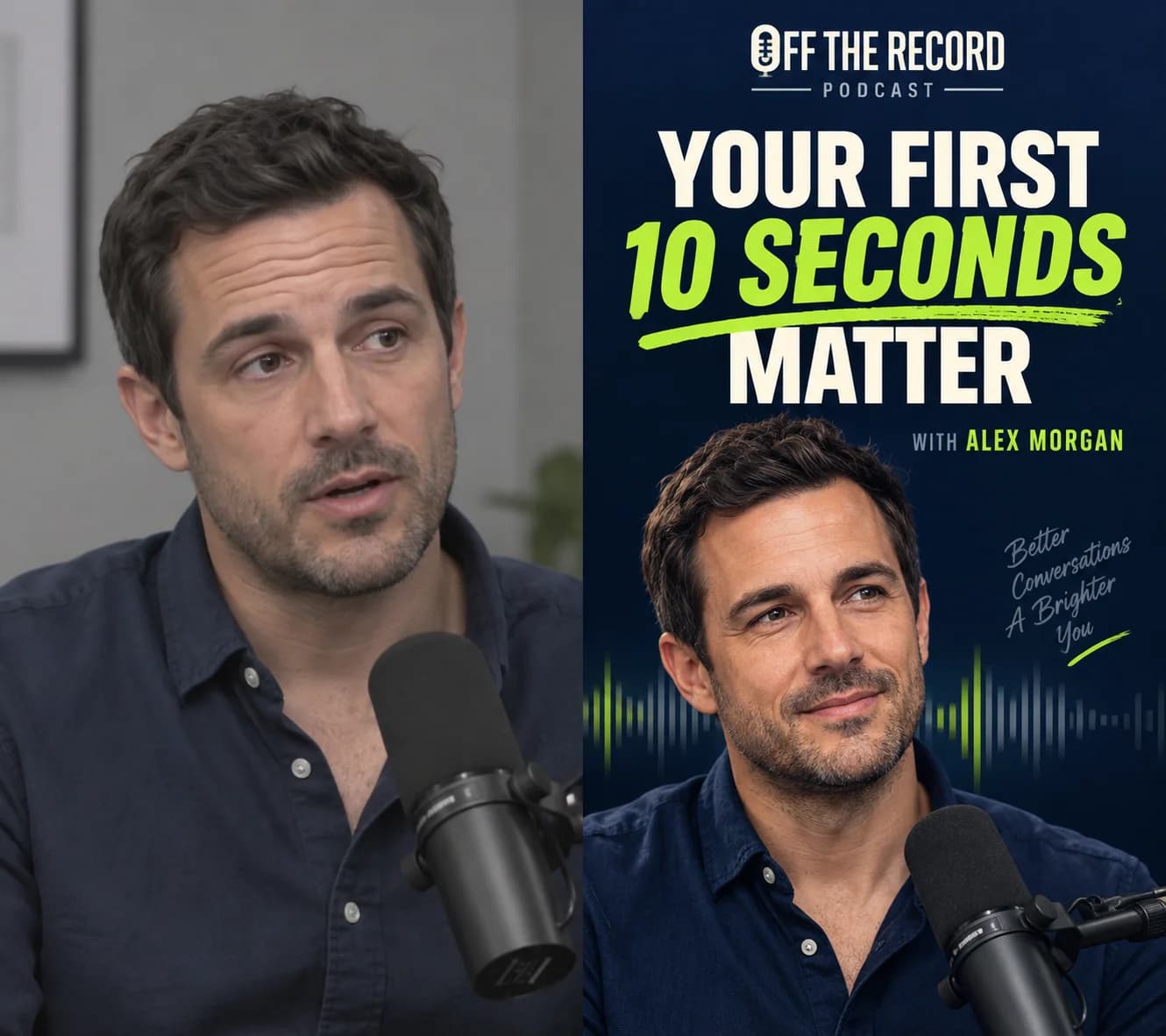
AfterA cover designed for the clip
Batch uploading
Upload finished clips to one library, then prepare the copy, choose connected accounts and schedule the releases as a campaign.
Explore feature 02Automatic captions
ClipPush reads your video's transcript and automatically writes a social post caption for each selected platform. Spend your time reviewing the copy, not writing every post from scratch.
Explore feature 03Platform-specific copy
Prepare a separate caption, title, description and hashtag set for every connected platform.
Explore feature 04AI-generated thumbnails
Create branded AI thumbnails using guest photos, logos and your creative direction. Generate a batch with a distinct title and design for each clip.
Explore feature 05Brand voice controls
Set the tone, spelling, length, calls to action, hashtags and phrases that ClipPush should avoid.
Explore feature 06Campaign review
Review the clip, cover, caption, destinations and schedule together before a post enters the queue.
Explore feature 07Social video scheduling
Schedule a batch of social video posts across connected accounts. Set your campaign cadence, review every release and adjust individual posts from one calendar.
Explore feature 08Performance analytics
Bring supported post and channel performance back into the same workspace used to plan the campaign.
Explore feature 09Social inbox
Review supported comments on your published posts and reply from one shared ClipPush inbox.
Explore feature 10Auto Clips
Start with a landscape podcast, interview or long-form video. Choose the maximum length and number of clips, then ClipPush transcribes it and makes vertical candidates for review.
Explore feature 11Team workspaces
Separate accounts, clips, voice settings, campaigns and calendars into dedicated workspaces for each show or client.
Explore feature 12API and MCP access
Use ClipPush through its API or MCP connection to create, inspect and manage publishing work from compatible tools.
Explore featureAuto Clips · ClipPush Pro
Start with the full video.
Upload a landscape podcast, interview or long-form video up to two hours or 5 GB. Choose the clip length and count, then Auto Clips finds self-contained moments, follows the active speaker and creates vertical candidates for your review.
See Auto ClipsOne release workspace
Keep the decision-making close to the clip.
No detached caption documents, unclear dates or hidden publishing states.