
Social media
Your podcast title deserves a fair test.
Changing a title three times before lunch gives you three titles and a fairly anxious morning. YouTube's testing tool offers a better comparison, provided you give it a useful question to answer.
An episode goes live with the guest's name, the show name and a subject somewhere near the end of the title. It gets a quiet start. You move the subject to the front, replace the thumbnail and refresh the analytics. The numbers shift. Naturally, the new version must be better.
Possibly. Or a different group of people has started seeing it. You've changed the artwork and the wording at once, so even a real improvement leaves you guessing about which change helped.
For podcasters publishing full episodes on YouTube, title and thumbnail testing is worth a place in the release routine. Not every episode needs an experiment. But when you're unsure how to explain a good conversation to someone who doesn't know the guest, a fair comparison beats an afternoon of nervous tinkering.
What YouTube actually lets you test
YouTube expanded its thumbnail testing tool to include titles on 8 December 2025. Eligible creators can compare up to three titles, thumbnails or paired combinations. For a full podcast episode, that gives you a way to compare different invitations to the same conversation. [TeamYouTube: title and thumbnail A/B testing announcement]
Current access is through desktop YouTube Studio and requires advanced features. Long-form episodes can qualify; Shorts, scheduled live streams and active Premieres cannot. Private, made-for-kids and mature-audience videos are excluded. Check your episode's eligibility before spending an evening making alternatives. [YouTube Help: A/B test titles and thumbnails]
I'd start with an episode that still deserves to be discovered, whose title you can improve without changing what the programme promises. A useful archive interview is a good candidate. An old conversation tied entirely to a deadline that has passed probably needs more than a brighter cover.
Decide what you want to learn
Suppose you've made an interview with a freelance illustrator. This is a hypothetical episode: the guest explains how they quote for a job, where revision requests get awkward and how they agree the scope with a client. There is enough substance for several honest titles.
The original might be 'Episode 42: A conversation with an illustrator'. Loyal listeners know what sort of conversation your show offers. A stranger has much less to go on. The first useful question is whether naming the specific problem makes the episode easier to choose.
| Possible title | What a new viewer would expect |
|---|---|
| How illustrators can price extra revisions | A practical explanation of charging for changes. |
| The revision clause missing from your illustration quote | A specific agreement or wording problem, with an explanation. |
| When a small client change needs a new quote | Help judging where the original scope ends. |
These are editorial possibilities, not tested winners. Before using any of them, check that the conversation supplies the answer. If the guest only mentions revision clauses in passing, the second title is doing more work than the episode.
YouTube advises keeping titles accurate and concise, putting important words near the start and leaving episode numbers and branding towards the end. That's a useful first edit before you test anything. Don't spend your experiment discovering that an unreadable title was unreadable. [YouTube Help: thumbnail and title tips]
Give the comparison a fair chance
A title-only test keeps the thumbnail fixed. A thumbnail-only test keeps the wording fixed. Changing both compares complete presentations. YouTube offers all three modes; choose the one that matches your question. [YouTube Help: A/B test titles and thumbnails]
For the illustrator episode, I would test the titles first if the current image already explains the subject clearly. Keep the same photograph or artwork in every version. That makes the result more useful when deciding how to write the next episode title.
If the problem is visual, perhaps the guest is lost among six logos and a paragraph of tiny text, fix that before debating adjectives. Try a simpler composition with the same title. You don't need three near-identical designs distinguished by the position of a small arrow.
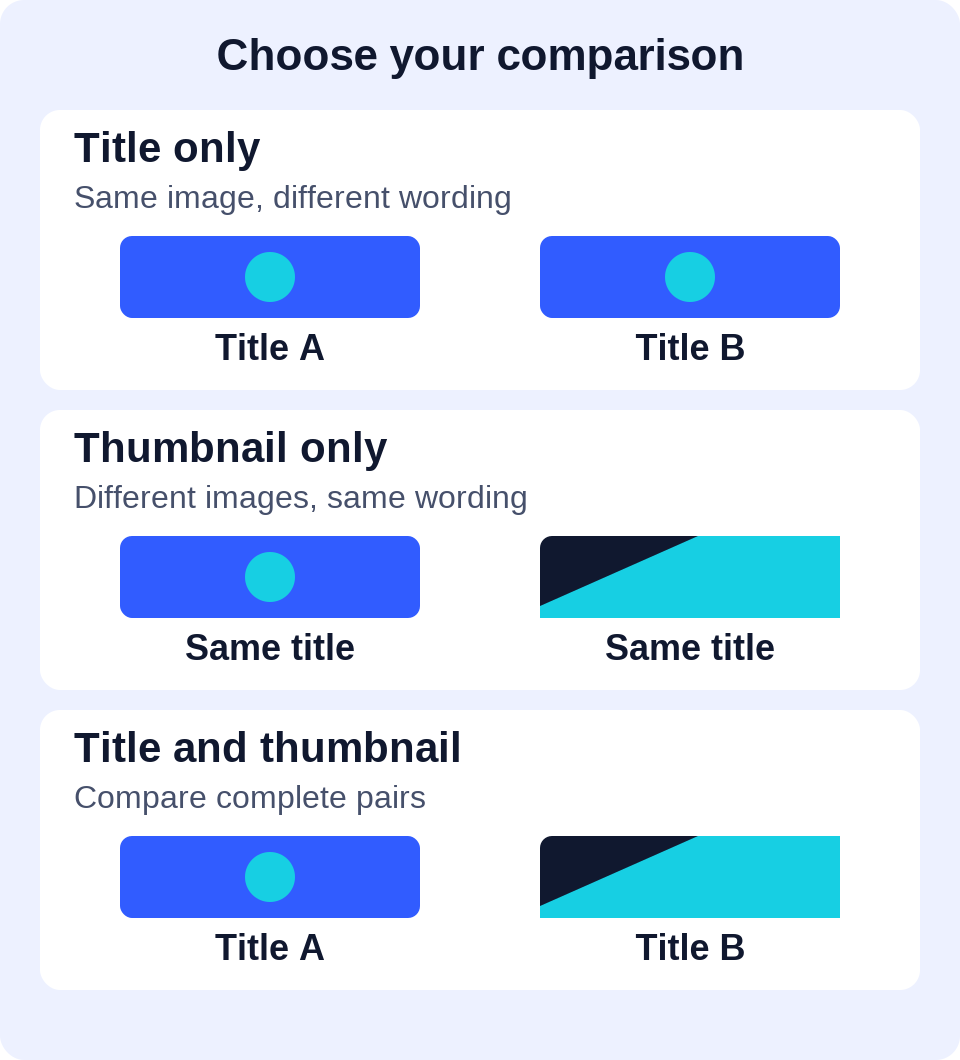
There is nothing wrong with a combined test when you want to choose the best complete presentation. Just record the result honestly: this pair worked better in this test. It doesn't establish that a particular colour, facial expression or word is a universal recipe.
Let the thumbnail add something
Read the title and look at the image together. If the title names the revision problem, the thumbnail could show the work being discussed: a marked-up drawing beside its earlier version, for example, provided those images are yours to use. A generic photograph of a laptop adds less.
Avoid trying to fit the whole episode into the picture. The guest's face, the show logo, a quotation, three topics and the episode number can become a surprisingly complicated postage stamp. For this example, one clear visual about revision requests is enough.
Shrink your design to roughly the size you encounter while browsing on a phone. This isn't a performance test. It's a legibility check. Can you understand the main object? Can you read the few words that matter? Does the design still make sense without the decorative detail?
A dramatic expression or an alarming phrase can misrepresent a calm, helpful interview. Ask the guest whether the proposed image fairly represents the conversation if there's any doubt. Their willingness to appear on the show isn't an invitation to make them look furious about something they explained quite patiently.
Set it running, then leave it alone
In desktop Studio, open the video and find A/B Testing in the title or thumbnail area. Select your mode, add the alternatives and save. Tests can take a few days, with up to two weeks allowed. Changing the title or thumbnail during a test stops it, so resist mid-test edits. [YouTube Help: A/B test titles and thumbnails]
Before starting, save a short note somewhere you will actually find it. A shared document is enough. Include:
- The episode URL and the date you started.
- The question: for example, whether a specific revision problem explains the episode better than a general guest introduction.
- The exact title and image files used in each option.
- Anything unusual about the release, such as a guest sharing it to a large professional group.
- A reminder to review the completed result, rather than announcing a winner from the first morning's numbers.
Keep a sensible default as your first option. Use a title you'd be happy to leave on the episode, rather than an intentionally weak control designed to make the alternatives look clever. The purpose is to choose useful wording, not stage a victory for the person who wrote it.
You can still promote the episode normally. Recording an unusual burst of attention gives the result some context when you return to it. It does not let you adjust away every complication or pretend you know exactly who saw each option.
A click is only the start of the visit
YouTube optimises its tests for watch time rather than click-through rate alone. Its announcement describes a winning option as significantly better at driving watch time per impression. That is a different question from which wording attracts the most clicks. [TeamYouTube: title and thumbnail A/B testing announcement]
Here's a deliberately simple illustration, not a YouTube result or its scoring formula. Imagine two versions each receive 1,000 impressions. One brings 100 viewers who stay for an average of one minute: 100 minutes watched. The other brings 70 viewers who stay for three minutes: 210 minutes watched.
The first has more clicks. The second produces more viewing in this example. Neither tells you whether those people enjoyed the programme, subscribed or returned next week. The point is narrower: making the invitation more tempting doesn't necessarily make the resulting visit more worthwhile.
When you review the episode, watch its opening with the chosen title in mind. A precise promise about revision fees followed by ten minutes of unrelated introductions creates a very particular disappointment. You can improve the opening on future episodes without pretending a title test has diagnosed every reason people leave.
Outside the experiment, be careful with headline CTR comparisons. YouTube warns that small changes can be ordinary variation and that different traffic sources can explain differences. Swapping a title on Tuesday and comparing its CTR with Monday isn't the same as a controlled comparison. [YouTube Help: impressions and click-through-rate FAQs]
An inconclusive result is still a result
YouTube can report 'Performed Same' or 'Inconclusive'. Small creative differences or too few impressions may prevent a clear winner. If no winner emerges, the first uploaded option becomes the default, although you can choose another manually. [TeamYouTube: title and thumbnail A/B testing announcement]
Don't translate that into 'all titles are equally good'. Nor should a small channel take it as evidence that the episode was a failure. The test may simply lack enough information to separate the options. Keep the clearest accurate version and record that the comparison didn't settle the question.
If you run another test later, change something meaningful. Compare a general subject with a particular problem, or an abstract design with a recognisable object. Replacing 'good' with 'great' is unlikely to teach you much about how people understand the episode.
Give the experiment a budget, too. If each version takes half a day to make, a weekly show can easily acquire a second production schedule devoted to its own wrapping. Save a reusable design and spend your effort on the idea being compared.
Take one useful decision into the next episode
Once the test finishes, write down the result label, the selected version and what you will do differently. Keep the conclusion small enough to defend. 'This episode's specific revision title performed better in this test' is useful. 'Our audience always wants negative titles' is a much larger claim.
For the next illustrator interview, you might ask the guest for a concrete example of a client change before recording. You might capture a clean image of the work, with permission, rather than trying to rescue a frame from the call. Those are practical improvements to the programme and its presentation.
Start with one episode you can explain honestly, two or three genuinely different options and a question you care about. Let the test finish. Then make the decision it supports, even if that decision is to keep the clearer title and move on with your week.
Sources and further reading
- TeamYouTube: title and thumbnail A/B testing announcement
Published 8 December 2025. Official TeamYouTube announcement, checked on 11 November 2026 alongside the current Help Centre guidance. Includes the rollout date, result labels and explanation of watch time per impression.
- YouTube Help: A/B test titles and thumbnails
Published Current help guidance; no publication date displayed. Current eligibility and workflow checked on 11 November 2026. Access depends on channel features, video format and content restrictions.
- YouTube Help: thumbnail and title tips
Published Current help guidance; no publication date displayed. Checked on 11 November 2026. Guidance on accurate titles, concise wording and the placement of important words.
- YouTube Help: impressions and click-through-rate FAQs
Published Current help guidance; no publication date displayed. Checked on 11 November 2026. Explains ordinary CTR variation and the effect of different traffic sources. The article's arithmetic is an illustrative example, not platform data.